 Laboratory Assignment: Polygons
Reading: Java: First Contact, Chapter 5
Exam 2 is scheduled for your lab time next Tuesday. As with the first exam, we will have a review in class on Monday.
The purpose of this problem set is to give you practice with iteration via tail recursion, while loops, and for loops.
The assignment consist of a two lab problems and one homework problem (there is no prelab this week). You are required to do all problems. As usual, please keep track of the time as you complete this assignment, and report it on the cover sheet. I eliminated Homework problem number 2. Just leave this space blank on the cover sheet.
Laboratory Assignment: PolygonsIn this lab you will program turtles to draw regular polygons. A regular polygon has sides of equal length and angles of equal length, as shown in the following images:
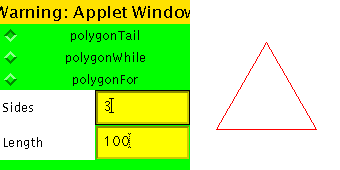
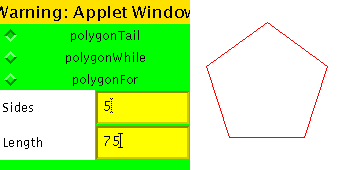
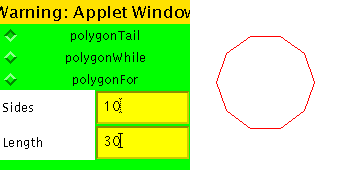
We will draw these polygons using three strategies for expressing iteration:
To get started, cd to your public_html directory, and unzip the file ~huang/cx121/ps9.zip. This will create a directory ps9 with three subdirectories, Polygons, Squares, and Cards. For this laboratory assignment, navigate to the subdirectory Polygons, and open the file PolygonWorld.java. For the first task, you will be fleshing out skeletons for various methods defined in the PolygonMaker class within PolygonWorld.java.
A turtle can draw a polygon by repeatedly drawing a side and then turning by an angle of (360.0/sides), until it has drawn the specified number of sides. One strategy for encoding this iteration is to use tail recursion. Below is the skeleton for such a such a strategy. The polygon() method invokes the tail recursive polygonTail() method with the appropriate initial parameters. Your first goal is to fill in the missing body of polygonTail().
    public void polygon (int sides, int length) {
        double angle = 360.0/(double)sides;
        polygonTail(sides, length, angle);
    }

    public void polygonTail(int numSides, int length, double angle){

        // FILL IN

    }
Next, fill in the bodies of the polygonWhile() and polygonFor() methods. As suggested by their names, the polygonWhile() method should express the polygon-drawing iteration via a while loop, and the polygonFor() method should express this iteration via a for loop. You can test your methods by selecting the appropriate checkbox in the Parameter window before pressing the Run button in the Turtle window.
Now that you can draw a polygon, you can use this method to draw polygon flowers. A polygon flower is defined by the number of petals and the number of sides of each petal. Each petal is a regular polygon, and the petals are rotated with respect to one another. The angle of rotation is equal to (360.0/petals). Some sample flowers are as follows:
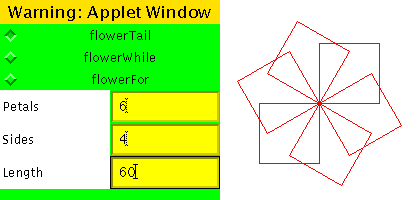
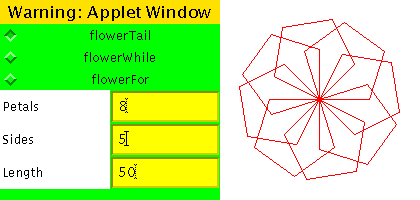
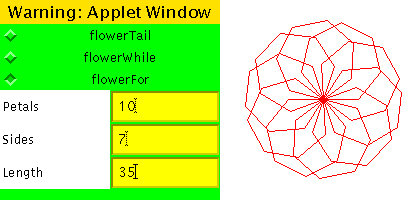
As with the polygons, we will write methods to draw these flowers using tail recursion, while loops and for loops. Fill out the skeletons for flowerTail(), flowerWhile(), and flowerFor() in the FlowerWorld.java file. Test out your methods by executing FlowerWorld.html and selecting the checkbox corresponding to the method you want to test.
 Homework Problem 1: Nested Frames
In this problem you will use iteration in to draw two-colored nested frame patterns like those shown below:
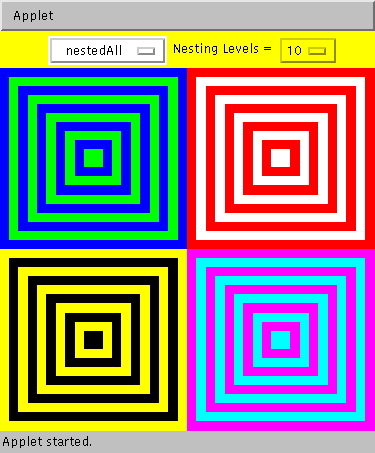
Each of the four patterns consists of concentric rectangular frames that have the same thickness and alternate between two colors. In the above example, each target has 10 nested frames, each of whose thickness is 1/20 of the dimensions allocated to the pattern.
In Picture World, such patterns can be drawn as a sequence of concentric filled rectangles, where the rectangles are draw from the outside in. You have been provided with the following method for creating a centered rectangular picture:
public Picture centeredRect (double fraction, Color c)
Returns a rectangle filled with color c that is centered in the picture canvas in which it is drawn. The width and height of the rectangle are each the given fraction of the enclosing picture canvas's width and height. The fraction argument must be between 0 and 1.
For example, using this method, here is a recursive implementation of the nested pattern:
    public Picture nestedRec(int levels, double thickness, Color c1, Color c2) {
        if (levels == 0) {
            return empty();
        } else {
            return overlay(nestedRec(levels - 1, thickness, c2, c1),
                           centeredRect(levels*thickness, c1));
        }
    }
Here, levels is the number of nested frames, thickness is the thickness of each frame edge, c1 is the outermost color, and c2 is the color that alternates with c1. The recursion accumulates a final picture that consists of levels centered rectangles overlayed on top of one another. Note how each level of the recursion decrements levels by 1 and swaps c1 and c2 (so that c2 is the outermost color in the nested subpicture). This strategy is not a tail recursive one, since there is still a pending overlay operation to be performed after the recursion returns.
In the rest of this problem, you will expore three iterative strategies for expressing the nested box pattern. You will be fleshing out the following skeletons in the file NestedFrames.java within the subdirectory Squares:
public Picture nestedIter(int n, double thickness, Color c1, Color c2) {
// This method contains the initial call to nestedTail, which does all the work.
    return nestedTail(n, thickness, c1, c2, empty());
}

public Picture nestedTail(int n, double thickness,
                          Color c1, Color c2, Picture ans) {
// nestedTail should be a tail recursive method that returns a Picture
// that is the nested frames pattern.

    // Replace the following stub by a correct definition.
    return empty();
}

public Picture nestedWhile(int n, double thickness, Color c1, Color c2) {
// Use a while loop to accumulate and return a Picture
// that is the nested frames pattern.

    // Replace the following stub by a correct definition.
    return empty();

}

public Picture nestedFor(int n, double thickness, Color c1, Color c2) {
// Use a for loop to accumulate and return a Picture
// that is the nested frames pattern.

    // Replace the following stub by a correct definition.
    return empty();
}
Your task is to flesh out all three methods so that they have the same behavior as nestedRec. You can test your methods by executing the NestedFrames.html applet. This will give you a window like that pictured at the beginning of this problem. By selecting an integer in the righmost choice box, you can change the nesting level of the patterns. Your code does not have to take care of calculating the thickness; this calculation is already performed by the testing environment.
The patterns are arranged as follows inside the NestedFrames Applet window:
In your definitions, pay attention to the following notes:
while (test-expression) { body-statements
  }
and a Java for loop has the syntax
for (init-statement; test-expression;
  update-statement) { body-statements }
A Java for loop is equivalent to the following while loop:
init-statement; while (test-expression)
{ body-statements; update-statement; }Prelab Assignment: No prelab this week :)
Laboratory Assignment: Turn in printouts of your files PolygonWorld.java and FlowerWorld.java
Homework Problem 1: Turn in a printout of your file NestedFrames.java
Create links from your homepage on benjerry to the files ps9/Polygons/PolygonWorld.html, ps9/Polygons/FlowerWorld.html, and ps9/Squares/NestedFrames.html.
As usual, staple your files together with the given cover sheet, and submit your hardcopy package by placing it in the box outside of my office (Warner 501B) by 3pm on Friday. You may also submit it in class on Friday.